What's an RSS reader, and why use one?
You're a drooling, mindless zombie, and deep down you know it. You're being held hostage by Al Gore rhythms whose cunning exceeds your willpower like the midday sun outshines a firefly—and the worst part is that you like it. First they came for Facebook, then Twitter, then Reddit—do you really have an enshittification red line, or will you simply boil to death like the proverbial frog?
Well, you needn't: you can fight back. You just need the power of the old internet to do it. Come hither, child, and receive the ancient wisdoms—I shall teach thee how to wield the mighty RSS reader.
What exactly does an RSS reader do?
Even as a technically-literate person, I was clueless about RSS readers1 for a long time—I'd hear übergeeks lament the death of Google Reader, but I still had no idea what an RSS2 reader was exactly, or how people were using one. In the hope of dispelling any similar confusions in you, dear reader, let's begin by setting aside any technical details and investigating: what problem does an RSS reader solve?
There's probably a number of websites that you want to follow regularly—say, your favourite webcomic, a couple of blogs you enjoy, and news updates from organizations in which you're interested. One way to do this is to simply bookmark those websites, then occasionally check them when you think about it. Obviously, this is far from a foolproof strategy: most days, you'll waste time checking lots of websites with no updates, but if you delay for too long you might miss something important. Instead, maybe you rely on an aggregator site (like Reddit), where users can post links and vote on content related to a particular community. But this isn't totally satisfactory either—you no longer have a direct connection to the creators you most care about; you're dependent on someone else finding those updates and sharing them. Furthermore, often these aggregators are commercial entities whose concern is not "what content and design would most benefit our users?," but rather "what content and design would most profit our shareholders?"
An RSS reader puts you in charge of your digital media consumption, and directly connects you with your favourite creators. You tell the RSS reader which creators to track. Whenever those creators post something new, your RSS reader will fetch it for you to peruse at your leisure. You might think of it as "your email inbox, but for the rest of the internet."
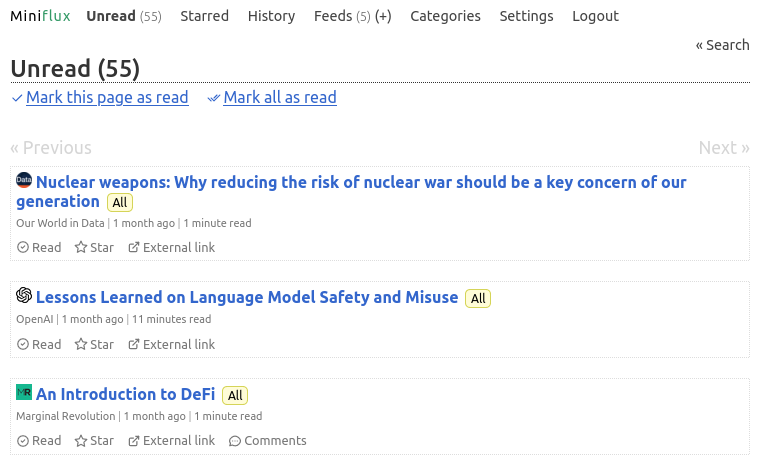
My Miniflux home page, showing my first few unread articles
Can you be a bit more specific?
Content creators can publish a log of their activity (e.g., blog posts, podcast episodes, etc.) as an RSS feed. That feed lists all the updates from that creator. Whenever a creator publishes something new, they add it to their feed (that process is usually automated by their publishing software).
An RSS reader subscribes to a number of RSS feeds—as selected by you—and periodically checks them for updates. Whenever you visit your RSS reader, it presents you with all the new content from your feeds; most feeds simply order those posts chronologically (no inscrutable "ranking" algorithms!). Typically you can view that content from within your RSS reader itself, making it a one-stop shop for keeping up-to-date with everything you care about.
Of course, RSS readers differentiate themselves with all kinds of different features and functionality, but the core is the same: check the RSS feeds periodically, and display the content in a convenient way.
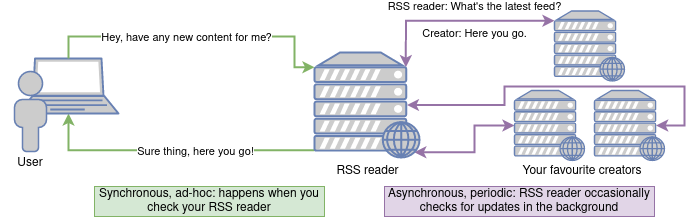
High-level diagram showing how your RSS reader makes content available for you. (Note: I've illustrated the RSS reader as web application running on a separate server from the user's laptop, but it could equally be a native application running on the laptop itself.)
Can you be disconcertingly over-specific?
Gladly!
I'll be honest: when I first started writing this article, I was making some informed guesses. I looked at some feeds and described how one could theoretically build a feed reader, but I didn't have any actual hands-on experience myself. So I did the only reasonable thing: I decided to learn Rust and write my own feed reader from the ground up.
I'm now the proud author of ToyRSS, the world's worst feed reader. You can give it a spin here, but uh, it doesn't support individual user accounts, so you'll need to share your feeds with the rest of the world. Sorry. But you can study the source code to get a sense of how you might build your own feed reader!
Why should I use an RSS reader?
We've covered the mechanics of how an RSS reader works, but you might not yet be sold on using one yourself. After all, in an era of AI-powered recommendations, doesn't manually curating a list of feeds feel quaint, if not downright antiquated? I disagree—here's why.
"Pull" model puts you in control of what you consume
I alluded to this earlier, but in this engagement-driven, VC-juiced, AI-intermediated attention economy, I think there's serenity to be had in putting yourself back in charge of what you consume. It's kind of like eating vegetables after pigging out on junk food: it's less immediately gratifying, but after a week you feel good about the decision. Say goodbye to doom-scrolling: once you've read everything in your feed reader, it's just empty. Good job—time to touch grass!
Forging connections with niche creators
Have you ever been linked to a post that you absolutely loved, only to never see anything else from that author ever again?
My favourite example of this is a blog called Sesquiotica. It's a veritable factory of etymological jewels: rhythmically pumping out tightly-constructed and wonderfully detailed explorations of words from the everyday to the decidedly unquotidian. I only stumbled on it perchance one day via Hacker News—and had I not an RSS reader, that fleeting encounter would have been my last. But happily it exposes a feed (as most blogs do!), and I've followed it ever since. That continued connection has given me an appreciation and respect for the author, James Harbeck, that never would have arisen from a one-off visit.
Surprise! You (probably) already use an RSS reader
Do you listen to podcasts on your phone? Then you, my friend, are already using a watered-down RSS reader. By means of proof, allow me to dissect some XML—a diversion that the uninterested reader can safely skip.
Down the rabbit hole…
For instance, consider this feed (which is for Law Bytes, a podcast I enjoy). That link might be difficult to open in your browser, or look strange—that's because it's the raw RSS feed itself. An RSS feed is written in XML, which is tailored to be more "machine-readable" than its cousin HTML (the latter is used to structure the human-friendly websites to which you're accustomed).
For convenience, I'll extract some sections of the feed for our examination. Let's start near the top, where we (unsurprisingly) find some general information about the podcast: the title of the podcast itself, a link to its website, and a short description.
<rss version="2.0">
<channel>
<title>Law Bytes</title>
<atom:link href="https://lawbytes.castos.com/feed" rel="self" type="application/rss+xml"/>
<link>https:// http://www.michaelgeist.ca</link>
<description>
In recent years the intersection between law, technology, and policy has exploded as digital policy has become a mainstream concern in Canada and around the world. This podcast explores digital policies in conversations with people studying the legal and policy challenges, set the rules, or are experts in the field. It provides a Canadian perspective, but since the internet is global, examining international developments and Canada’s role in shaping global digital policy is be an important part of the story. Lawbytes is hosted by Michael Geist, a law professor at the University of Ottawa, where he holds the Canada Research Chair in Internet and E-commerce Law and where he is a member of the Centre for Law, Technology and Society.
</description>
Here's another interesting one: on your phone, you probably expect to see a nice icon representing the podcast; maybe this is where it comes from? Take a look for yourself—sure seems like it!

<itunes:image href="https://episodes.castos.com/lawbytes/images/Project.png"/>
Scrolling down a bit, we see the details for a particular episode. I've removed a bunch of lines to focus on the basics, but I recommend reading the raw thing if you're interested—although RSS is an open format, there's an interesting quantity of iTunes/Spotify specific "hints" in the feed...
Okay, we've got a title, date, creator, permalink for posterity... and the podcast episode itself seems to be in that
<enclosure> element? Sure enough, visiting that URL simply brings up the audio recording of the episode. I find that
charmingly old-timey: "Dear sir, it is with great joy and some pride that I convey to you my latest acoustic recording,
enclosed."
<item>
<title>
Episode 125: Sue Gardner on Journalism, the Internet Platforms, and the Online News Act
</title>
<pubDate>Mon, 11 Apr 2022 10:00:12 +0000</pubDate>
<dc:creator>Michael Geist</dc:creator>
<guid isPermaLink="true">
https://lawbytes.castos.com/podcasts/1553/episodes/episode-125-sue-gardner-on-journalism-the-internetqjj
</guid>
<enclosure url="https://chtbl.com/track/ED9CFB/episodes.castos.com/lawbytes/ee51ecef-63d0-4e0d-9b79-42c93c689643-Ep.-125-Gardner.mp3" length="35519402" type="audio/mpeg"/>
</item>
We've only scratched the surface of how a podcast's RSS feed is structured, but I hope that's already enough detail for
you to visualize how a podcast app might work. Search for a podcast? We just need to maintain some searchable database
associating podcast names to their RSS feeds. Subscribing to a podcast just means periodically checking its feed for
updates. Downloading an episode simply involves following the enclosure URL we saw, and the podcast app itself could
internally track the episodes the user listened to. Therein lies the zen of RSS: it's just simple, structure
data—trivial to both produce and consume, and yet endlessly useful.
So, if you love podcasts, you're already using RSS—why not extend your use of it beyond just audio?
Example: how I use my RSS reader
If this is still a little nebulous to you, let me walk you through exactly how I use my RSS reader day-to-day.
My RSS reader of choice: Miniflux
In today's world, I consider all software broken by default. This isn't a judgement that software is inherently evil, or even an empirical claim about the preponderance of bugs; it's merely a mantra that I need to repeat to myself daily in hopes of avoiding a premature coronary bypass. Software these days is either agonizingly slow (any webapp required by one's employer), sporadically or entirely non-functional (my car's infotainment system), and/or so transparently designed to separate you from your money as to make one envious of a dairy cow (take your pick).
Miniflux, my RSS reader of choice, is a rare exception to those trends. It is, in its own words, "a minimalist and opinionated feed reader." It's no-nonsense: it excels at the basic functionality, and avoids useless filler. It's a progressive web app, so on your desktop it acts like any other website, but you can "install" it on your phone for a more app-like experience; it works great in either case. I've been actively using it for over five years now, and I have no intention of stopping any time soon—my only gripe is that it doesn't have a proper offline mode, which would be handy for travelling.
My day-to-day
My daily usage of Miniflux is pretty mundane: whenever I have some time to kill, I open it up (almost always from my phone), and see if anything grabs my attention. These days I follow a variety of feeds, so my inbox is a mix of everything from brief news updates (be it from my municipality or from Arch Linux), heavy-hitter internet comics, to long-form articles from all over the blogosphere. I used to be obsessive about getting back to inbox zero, but I'm now subscribed to too many feeds for that to be practical—I read as much as catches my interest and periodically declare feed bankruptcy where I mark everything as read and start fresh.
Finding feeds
When I first started using Miniflux, my only subscriptions were the handful of blogs I knew I wanted to follow. Nowadays, I follow over 100 feeds, which generally came from the following categories:
- Aggregators: I know I inveighed against them above, but platforms like Reddit or Hacker News can be a great way to find blogs you'd never stumble upon otherwise. Treat them like sodium in your media diet: a pinch goes a long way, but any more is detrimental to your health.
- Newsletters: yes, you can get email newsletters in your RSS reader—we'll cover the details later.
- Local community updates: want to be better informed about your community? There's likely feeds covering everything from road closures to election updates.
- Your favourite organizations: any non-profits you care about, or even just your favourite tech company—they probably publish a feed you can use to stay up-to-date.
- Favourite publications: I love me a good Quanta article, but it's not something I'd check daily; nowadays I see all the headlines and dive in when one piques my curiosity.
- Forum posts: ever find a forum post that describes the exact problem you're having, but a fix isn't available yet? Pop that thread into your RSS reader (which is almost always supported) and you'll know as soon as the solution lands.
Alternatively, maybe a better starting point is to look for what platforms you frequent today that provide feeds; a creator using any of the below almost certainly already has an RSS feed waiting for you:
- Wordpress
- Substack
- Youtube
- Blogger (admittedly, less relevant these days…)
- Most forums, including for particular topics/threads
- Most news sites and traditional publications
Subscribing to feeds
Here's a question that might seem really silly but stumped me at first: say you're browsing a website and want to subscribe to it in your RSS reader—what exactly do you do?
The process will vary depending on the exact RSS reader you're using, but a good starting strategy is: copy the URL of
the page you're already on, click "add feed" in your reader, then paste in that URL. If the website you're trying to
subscribe to offers a feed, it will generally advertise it in a way that your reader will be able to discover. For
instance, if you're reading this on simpsonian.ca, you'll see this snippet in the <head> of this page's HTML:
<link rel="alternate" type="application/atom+xml" title="RSS" href="https://simpsonian.ca/atom.xml">
If that approach doesn't work, the site might still have a feed, it just isn't being advertised properly. Look for a link on the page titled something like "RSS", "Atom", or "Feed" (or the classic orange RSS logo) and try pasting that link's URL into your reader instead.3 If you come up empty on those, it's likely the site simply doesn't offer a feed, and your only recourse will be supplicating the webmaster to add one (although you might be surprised how many websites already offer a feed).
Okay, I'm in. How do I start?
I've already made clear my love for Miniflux; if the minimalist thing works for you, the developer offers a hosted version with a free trial. (For the technically-minded, you can also self-host it, which is what I do.) More mainstream options include Inoreader and Feedly; NetNewsWire seems to have an ardent following on MacOS. For the true terminal dwellers, there's Newsboat, which looks spartan even by my standards. The core logic of a feed reader is straightforward, so if none of those speak to you, don't despair—options abound.
Frequently Imagined Questions
Can't I just subscribe to email newsletters?
Sure, if every creator you're interested in publishes a newsletter via email, that offers many of the same benefits as an RSS reader: notably, you can get all your updates from all creators automatically delivered to one place. However, I have two objections:
- Not all creators publish their content via a newsletter.4 (Ahem.)
- Have you seen the state of your inbox lately? Yuck.
RSS readers are designed specifically for displaying these updates, and many RSS feeds are kind enough to provide the entire content (rather than just a link back to the original source)—I think you'll find perusing that way to be much more enjoyable. And it doesn't run the risk of a job offer getting lost amongst the many depraved fanfic serials you follow.
What about content that only exists as an email newsletter, like Matt Levine's sublime Money Stuff? No compromise required: Leandro Facchinetti has got you covered with Kill the Newsletter!. Kill the Newsletter! is a simple but genius idea: it creates a "burner" email address that you use to sign up for the newsletter of interest (rather than your personal email address). Kill the Newsletter! also hosts an Atom feed specifically for that email address (for you to subscribe to): whenever the email address receives mail, a new entry containing exactly that message is added to the feed. The end result is that you can consume email newsletters without leaving the paradise of your RSS reader. It's worked flawlessly for me for over five years, and the source code is available should you rather self-host.
Someone I like following is only on Instagram, what can I do?
Honestly, not much.
If a content creator chooses to exclusively use a platform over which they have no control (e.g., Instagram), their interactions with their audience will necessarily be mediated by the owners of the platform (in this case, the benevolent Zucc). Note that this may well be a profitable choice for a creator—it's quite plausible they could grow and monetize a following on Instagram that they couldn't do independently, but it means ceding control to the platforms; in the long run, such abdication may prove to be a Faustian bargain.
(In some cases, corporate overlords might temporarily permit workarounds—like nitter, which can expose RSS feeds for a Twitter user's activity—but I wouldn't rely on them long-term; much like entropy, the arrow of enshittification points one way only.)
While you might not be able to convert others, you can always lead by example. Whenever you're sharing online (personally, or on behalf of an employer), ask yourself—is there an open way to access this information? Do we provide an RSS or Atom feed? Note that this doesn't require withdrawing from social media either: after posting on your own site, you can of course share it everywhere else without becoming dependent on those other platforms—a strategy known to ardent bloggers as POSSE ("publish on own site, syndicate elsewhere").
You just said "Atom feed;" is that different from an RSS feed?

Technically, yes; practically, no. The "Atom" format for feeds was an attempt to clean up some of the quirks and technical shortcomings of RSS proper; both formats are still seen in the wild today, but any feed reader worth its salt will understand both and you'll be none the wiser.
Conclusion
Well? You feel the atavistic magicks coursing through you, do you not? Good, good… though but a seed of power has been planted in you today, nurture it, and in due time that germ shall blossom. Soon you shall tame the innumerate lanes of the information superhighway, deftly weaving them through your personal nexus so that you might sip of their precious data.
Go forth, my child—go forth and feed.
Yes, yes; "RSS reader" is a misnomer, "feed reader" or "feed aggregator" is more accurate, but I'll stick with the former today; I feel it still retains some edge in name recognition.
By the way, RSS stands for "really simple syndication." Get ready for some semantic satiation on that one.
You know you're truly desperate when you resort to blindly guessing at plausible URLs: /rss,
/rss.xml, /atom.xml—surely one of these will resolve, right?
There's an interesting economic angle here: sending emails en masse is the dream of every would-be spammer, so we, as a society, have effectively imposed slight costs to discourage it—if you want to email your updates to thousands of followers, you'll almost certainly need the help of some paid service. If sending emails is a push that might annoy the recipient, consuming an RSS feed is a pull where the reader is fully in control; the end result is that RSS feeds are generally free and trivial to set up independently, whereas high-volume email delivery requires some kind of ongoing commercial support.